Change Label
Change VM Label
The label is the unique identifier for your virtual machine within the network. With this setting, you can modify the VM’s label to suit your organizational standards or project requirements. Changing the label can help with better identification, or alignment with specific naming conventions.
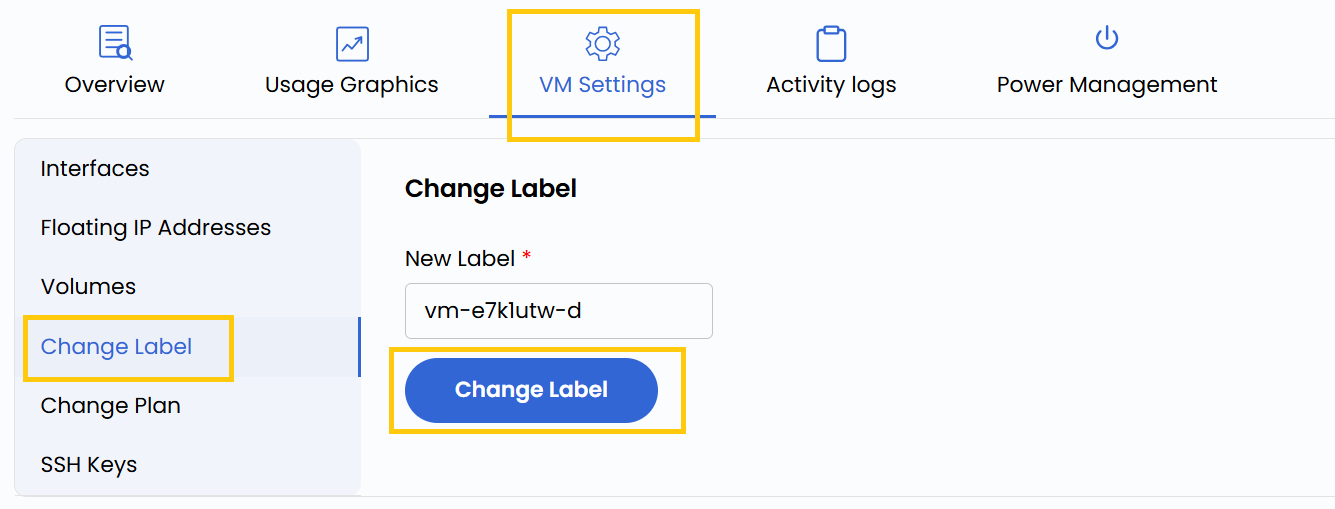
- To change label, go to the VM settings and navigate to the Change Label section.
- Enter the new label name and click on Change Label.
- Change the label recognized when this server is installed. For active servers, you may change the label by logging into the OS. We have guides for most platforms.
warning
Change Label Will Restart Your Virtual Machine
Conclusion
Modifying your VM label is a simple but effective way to maintain clarity and consistency across your cloud infrastructure. Whether organizing resources by environment, department, or function, using clear labels improves manageability and collaboration.